If you want to redirect your store's visitor to Amazon product page, you can follow the below mentioned steps.
1. Click on Auto Sync option under Settings menu at the left menu bar or at the middle box of dashboard page.
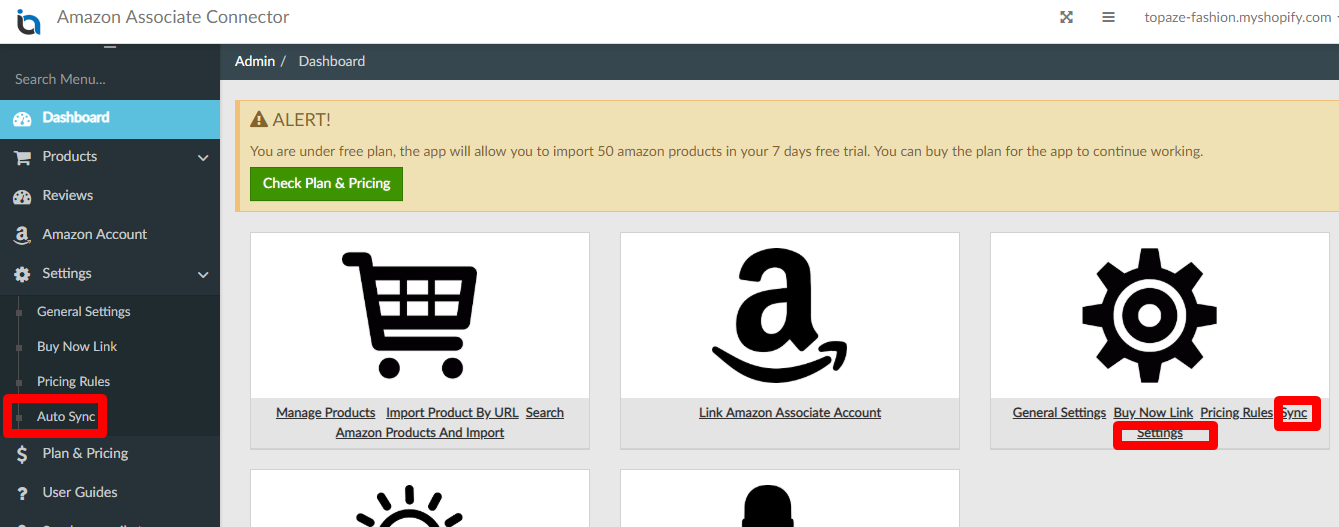
2. This setting page has various options as described below.
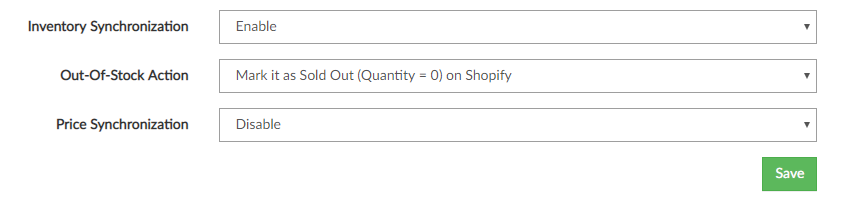
1. Inventory Synchronization:
When this option is enabled the stock status of all imported products will be updated from Amazon to Shopify once in a day.
If any product is in-stock on amazon, app will update quantity on Shopify depends on the Default Quantity under General Settings in the app.
If any product is out of stock, app will take action depends on the Out-Of-Stock Action settings below.
Please note that the Inventory Policy should be set to Shopify track this product's inventory to use this feature.
2. Out-Of-Stock Action:
If Inventory Synchronization is enabled, this value will decide the action taken by the App, when any product goes out of stock on Amazon.
You can choose one of the below mentioned out of stock actions:
- Make it as Sold Out (Quantity = 0) on Shopify: If this option is selected, the Shopify product will be marked as out of stock when the related product on amazon is ended or out of stock.
- Unpublish out-of-stock products: If this option is selected, the Shopify product will be marked as Unpublished when the related product on amazon is ended or out of stock.
- Delete out-of-stock products: If this option is selected, the Shopify product will be deleted when the related product on amazon is ended or out of stock.
3. Price Synchronization:
When this option is enabled the price will be updated from Amazon to Shopify once in a day. Price Rules settings will also be applied if enabled.