If you want to redirect your store's visitor to Amazon product page, you can follow the below mentioned steps.
By following these steps the Add to Cart button on Shopify product page will be replaced by View On Amazon button and clicking on button will redirect visitor to related Amazon product page instead of adding product to the cart.
1. Click on Buy Now Link option under Settings menu at the left menu bar or at the middle box of dashboard page.
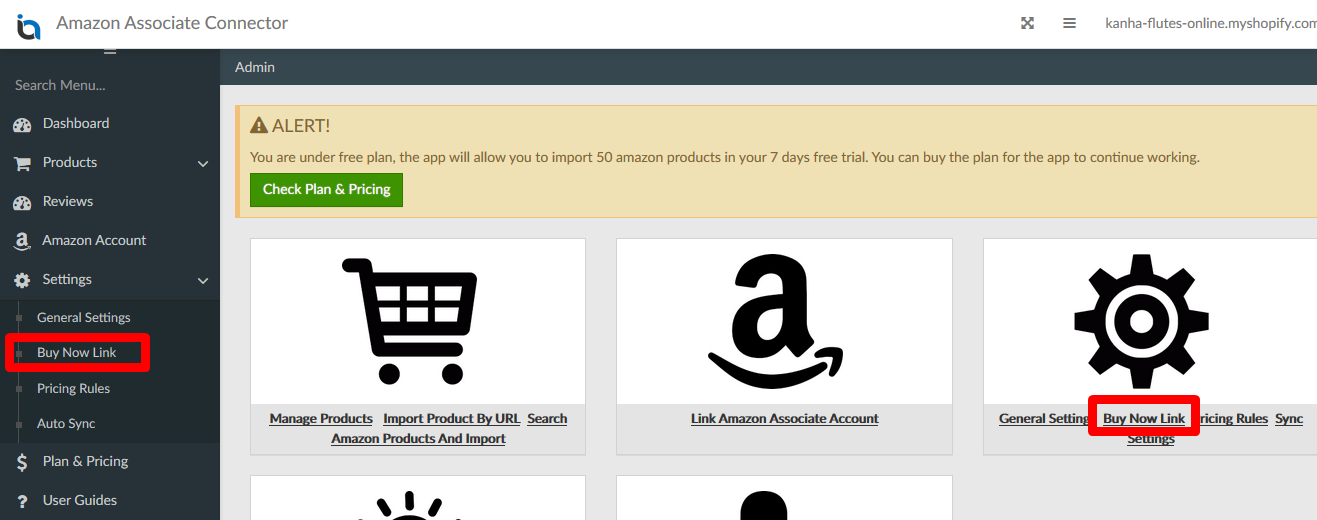
2. The setting page has various options as described below.
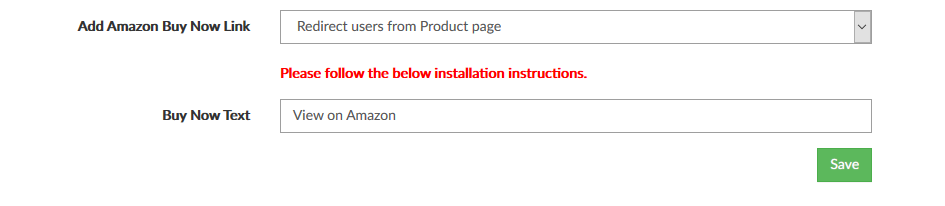
Add Amazon Buy Now Link: This drop-down can have one of the below two values.
- Redirect users from Product page: Choose this option if you want your visitors to be redirected to Amazon from Shopify's product page.
This feature will also need to add some code in your Theme liquid files. Click here for the instructions.
- Don't redirect users to Amazon: Choose this option if you don't want to redirect your visitors to amazon from Shopify's product page. Visitors will see the normal Add To Cart button on Shopify's product page.
Buy Now Text: If you choose to redirect visitors to Amazon, this text will be shown instead of Add To Cart button on Shopify's product page.